Designing Holiday Play with Code and ml5.js
An interactive Christmas project powered by machine learning, where users choose festive face filters through simple gestures.
Updates
Jan 12, 2024

Overview
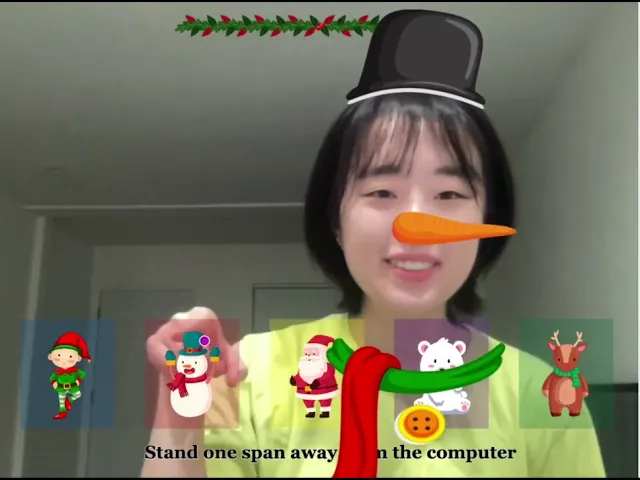
The Christmas Face Filters project is an interactive web application that spreads holiday cheer through playful, Christmas-themed filters. Using a webcam and machine learning, users can instantly transform themselves into festive characters such as Santa, a snowman, Rudolf, an elf, or even a polar bear.
What makes this project stand out is its hands-free interaction. Instead of clicking buttons, users select filters by pointing in the air, creating a magical and intuitive experience.
Tools | Timeline | Target Audience |
|---|---|---|
ml5.js, p5.js, Procreate | December 2023 | The app was designed for people of all ages who want to immerse themselves in the Christmas spirit. Families, kids, and even Santa himself can try it out. The playful gesture-based interaction especially resonates with teens and young adults who are used to experimenting with digital filters. |
How It Works
Two machine learning models power the experience:
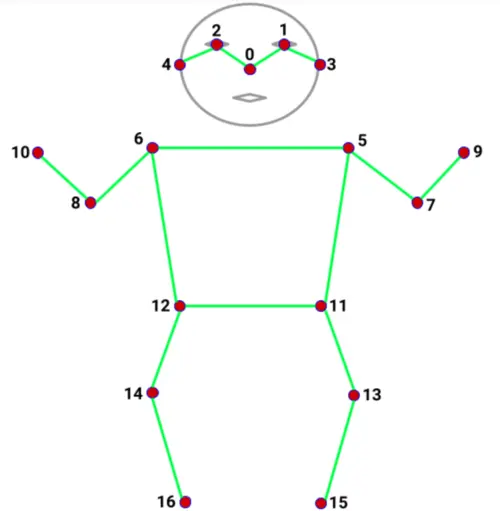
PoseNet detects the user’s nose, anchoring elements like Santa’s mustache in the right spot.
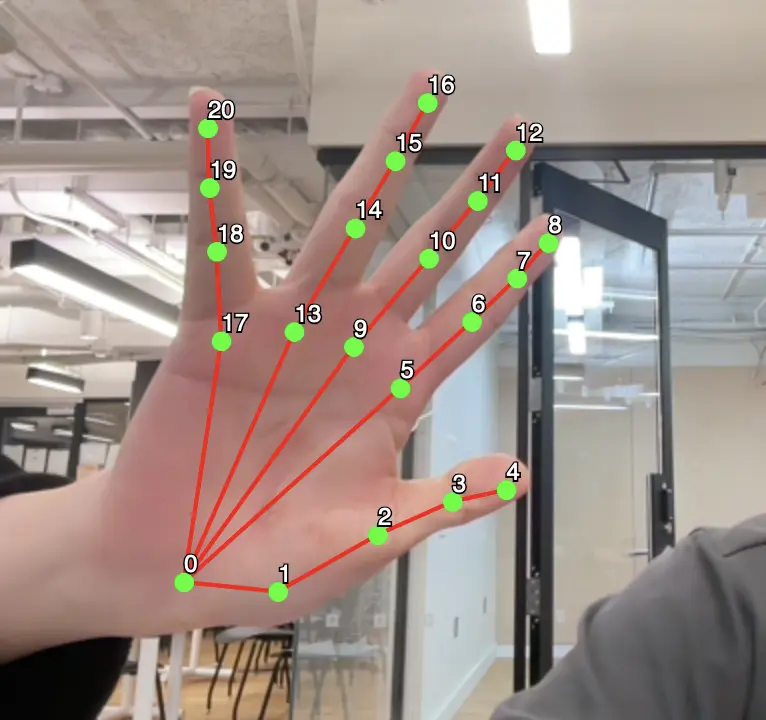
HandPose tracks the index finger, allowing the user to “point” at boxes on screen that correspond to different filters.
When the finger hovers over one of five selection boxes, the related filter is applied. If no box is selected, the user simply sees their unfiltered self. This logic ensures a seamless, real-time interaction.
Process
Before coding, I sourced free-licensed assets from Freepik and refined them in Adobe Illustrator to rescale and simplify the illustrations to work smoothly in the browser.
From there, I:
Uploaded and configured PoseNet and HandPose models in p5.js.
poseNet = ml5.poseNet(video, modelReady);
poseNet.on("pose", function (results) {
  poses = results;
});
function loadHandPose() {
  // Load the model
  handpose = ml5.handpose(video, modelLoaded);

  // Listen to new 'predict' events
  handpose.on("predict", gotPose);

  // Create an ml5 neural network
  let options = {
    task: "classification",
    debug: true,
  };
  brain = ml5.neuralNetwork(options);
}
Defined coordinates for the nose and finger to control filter placement.
let nosex = poses[0].pose.nose.x;
let nosey = poses[0].pose.nose.y;
indexX = int(results[0].annotations.indexFinger[3][0]);
indexY = int(results[0].annotations.indexFinger[3][1]);
Coded logic for five filter options, each triggered by the position of the index finger.
// Elf filter
if (20 <= indexX && indexX <= 115 && 320 <= indexY && indexY <= 430) {
  image(elfLeftEar, nosex - 120, nosey - 110, 70, 70);
  image(elfRightEar, nosex + 120, nosey - 110, 70, 70);
  image(elfHat, nosex, nosey - 155, 190, 150);

// Snowman filter
} else if (145 <= indexX && indexX <= 240 && 320 <= indexY && indexY <= 430) {
  image(snowmanHat, nosex, nosey - 170, 140, 100);
  image(snowmanNose, nosex + 40, nosey, 130, 40);
  image(snowmanScarf, nosex, nosey + 200, 180, 180);

// Santa filter
} else if (270 <= indexX && indexX <= 365 && 320 <= indexY && indexY <= 430) {
  image(santaHat, nosex, nosey - 170, 180, 150);
  image(santaBeard, nosex, nosey + 80, 150, 200);

// Polar Bear filter
} else if (395 <= indexX && indexX <= 490 && 320 <= indexY && indexY <= 430) {
  image(polarbearLeftEar, nosex - 80, nosey - 150, 100, 100);
  image(polarbearRightEar, nosex + 80, nosey - 140, 100, 100);
  image(polarbearNose, nosex - 10, nosey, 70, 70);

// Rudolf filter
} else if (520 <= indexX && indexX <= 615 && 320 <= indexY && indexY <= 430) {
  image(rudolfNose, nosex, nosey, 30, 30);
  image(rLeftHorn, nosex - 80, nosey - 140, 100, 150);
  image(rRightHorn, nosex + 80, nosey - 140, 100, 150);

// No filter
} else {
  console.log("0");
}
Tested and refined the outputs so filters lined up consistently with facial features.
Challenge & Solution
Running two machine learning models at once slowed the app down. For instance, only HandPose would load while PoseNet lagged. To fix this, I used setTimeout to give PoseNet time to initialize before HandPose kicked in. This small adjustment made the application more stable and reliable.
setTimeout(loadHandPose, 3000);
User Testing & Iteration
I tested the project with peers, whose feedback guided several improvements:
Feedback: Hard to aim at boxes → Solution: Added a one-sentence instruction at the bottom of the canvas.
Feedback: Canvas looked plain → Solution: Added a Christmas ornament for extra charm.
These refinements not only improved usability but also made the interaction more fun and festive.
Final Outcome
The end result is a joyful, interactive experience where users can instantly become a Christmas character. By combining playful visuals with machine learning, the project demonstrates how technology can create small but memorable moments of delight.
More to Discover


Designing Holiday Play with Code and ml5.js
An interactive Christmas project powered by machine learning, where users choose festive face filters through simple gestures.
Updates
Jan 12, 2024
Overview
The Christmas Face Filters project is an interactive web application that spreads holiday cheer through playful, Christmas-themed filters. Using a webcam and machine learning, users can instantly transform themselves into festive characters such as Santa, a snowman, Rudolf, an elf, or even a polar bear.
What makes this project stand out is its hands-free interaction. Instead of clicking buttons, users select filters by pointing in the air, creating a magical and intuitive experience.
Tools | Timeline | Target Audience |
|---|---|---|
ml5.js, p5.js, Procreate | December 2023 | The app was designed for people of all ages who want to immerse themselves in the Christmas spirit. Families, kids, and even Santa himself can try it out. The playful gesture-based interaction especially resonates with teens and young adults who are used to experimenting with digital filters. |
How It Works
Two machine learning models power the experience:
PoseNet detects the user’s nose, anchoring elements like Santa’s mustache in the right spot.
HandPose tracks the index finger, allowing the user to “point” at boxes on screen that correspond to different filters.
When the finger hovers over one of five selection boxes, the related filter is applied. If no box is selected, the user simply sees their unfiltered self. This logic ensures a seamless, real-time interaction.
Process
Before coding, I sourced free-licensed assets from Freepik and refined them in Adobe Illustrator to rescale and simplify the illustrations to work smoothly in the browser.
From there, I:
Uploaded and configured PoseNet and HandPose models in p5.js.
poseNet = ml5.poseNet(video, modelReady);
poseNet.on("pose", function (results) {
  poses = results;
});
function loadHandPose() {
  // Load the model
  handpose = ml5.handpose(video, modelLoaded);

  // Listen to new 'predict' events
  handpose.on("predict", gotPose);

  // Create an ml5 neural network
  let options = {
    task: "classification",
    debug: true,
  };
  brain = ml5.neuralNetwork(options);
}
Defined coordinates for the nose and finger to control filter placement.
let nosex = poses[0].pose.nose.x;
let nosey = poses[0].pose.nose.y;
indexX = int(results[0].annotations.indexFinger[3][0]);
indexY = int(results[0].annotations.indexFinger[3][1]);
Coded logic for five filter options, each triggered by the position of the index finger.
// Elf filter
if (20 <= indexX && indexX <= 115 && 320 <= indexY && indexY <= 430) {
  image(elfLeftEar, nosex - 120, nosey - 110, 70, 70);
  image(elfRightEar, nosex + 120, nosey - 110, 70, 70);
  image(elfHat, nosex, nosey - 155, 190, 150);

// Snowman filter
} else if (145 <= indexX && indexX <= 240 && 320 <= indexY && indexY <= 430) {
  image(snowmanHat, nosex, nosey - 170, 140, 100);
  image(snowmanNose, nosex + 40, nosey, 130, 40);
  image(snowmanScarf, nosex, nosey + 200, 180, 180);

// Santa filter
} else if (270 <= indexX && indexX <= 365 && 320 <= indexY && indexY <= 430) {
  image(santaHat, nosex, nosey - 170, 180, 150);
  image(santaBeard, nosex, nosey + 80, 150, 200);

// Polar Bear filter
} else if (395 <= indexX && indexX <= 490 && 320 <= indexY && indexY <= 430) {
  image(polarbearLeftEar, nosex - 80, nosey - 150, 100, 100);
  image(polarbearRightEar, nosex + 80, nosey - 140, 100, 100);
  image(polarbearNose, nosex - 10, nosey, 70, 70);

// Rudolf filter
} else if (520 <= indexX && indexX <= 615 && 320 <= indexY && indexY <= 430) {
  image(rudolfNose, nosex, nosey, 30, 30);
  image(rLeftHorn, nosex - 80, nosey - 140, 100, 150);
  image(rRightHorn, nosex + 80, nosey - 140, 100, 150);

// No filter
} else {
  console.log("0");
}
Tested and refined the outputs so filters lined up consistently with facial features.
Challenge & Solution
Running two machine learning models at once slowed the app down. For instance, only HandPose would load while PoseNet lagged. To fix this, I used setTimeout to give PoseNet time to initialize before HandPose kicked in. This small adjustment made the application more stable and reliable.
setTimeout(loadHandPose, 3000);
User Testing & Iteration
I tested the project with peers, whose feedback guided several improvements:
Feedback: Hard to aim at boxes → Solution: Added a one-sentence instruction at the bottom of the canvas.
Feedback: Canvas looked plain → Solution: Added a Christmas ornament for extra charm.
These refinements not only improved usability but also made the interaction more fun and festive.
Final Outcome
The end result is a joyful, interactive experience where users can instantly become a Christmas character. By combining playful visuals with machine learning, the project demonstrates how technology can create small but memorable moments of delight.
More to Discover
Designing Holiday Play with Code and ml5.js
An interactive Christmas project powered by machine learning, where users choose festive face filters through simple gestures.
Updates
Jan 12, 2024
Overview
The Christmas Face Filters project is an interactive web application that spreads holiday cheer through playful, Christmas-themed filters. Using a webcam and machine learning, users can instantly transform themselves into festive characters such as Santa, a snowman, Rudolf, an elf, or even a polar bear.
What makes this project stand out is its hands-free interaction. Instead of clicking buttons, users select filters by pointing in the air, creating a magical and intuitive experience.
Tools | Timeline | Target Audience |
|---|---|---|
ml5.js, p5.js, Procreate | December 2023 | The app was designed for people of all ages who want to immerse themselves in the Christmas spirit. Families, kids, and even Santa himself can try it out. The playful gesture-based interaction especially resonates with teens and young adults who are used to experimenting with digital filters. |
How It Works
Two machine learning models power the experience:
PoseNet detects the user’s nose, anchoring elements like Santa’s mustache in the right spot.
HandPose tracks the index finger, allowing the user to “point” at boxes on screen that correspond to different filters.
When the finger hovers over one of five selection boxes, the related filter is applied. If no box is selected, the user simply sees their unfiltered self. This logic ensures a seamless, real-time interaction.
Process
Before coding, I sourced free-licensed assets from Freepik and refined them in Adobe Illustrator to rescale and simplify the illustrations to work smoothly in the browser.
From there, I:
Uploaded and configured PoseNet and HandPose models in p5.js.
poseNet = ml5.poseNet(video, modelReady);
poseNet.on("pose", function (results) {
  poses = results;
});
function loadHandPose() {
  // Load the model
  handpose = ml5.handpose(video, modelLoaded);

  // Listen to new 'predict' events
  handpose.on("predict", gotPose);

  // Create an ml5 neural network
  let options = {
    task: "classification",
    debug: true,
  };
  brain = ml5.neuralNetwork(options);
}
Defined coordinates for the nose and finger to control filter placement.
let nosex = poses[0].pose.nose.x;
let nosey = poses[0].pose.nose.y;
indexX = int(results[0].annotations.indexFinger[3][0]);
indexY = int(results[0].annotations.indexFinger[3][1]);
Coded logic for five filter options, each triggered by the position of the index finger.
// Elf filter
if (20 <= indexX && indexX <= 115 && 320 <= indexY && indexY <= 430) {
  image(elfLeftEar, nosex - 120, nosey - 110, 70, 70);
  image(elfRightEar, nosex + 120, nosey - 110, 70, 70);
  image(elfHat, nosex, nosey - 155, 190, 150);

// Snowman filter
} else if (145 <= indexX && indexX <= 240 && 320 <= indexY && indexY <= 430) {
  image(snowmanHat, nosex, nosey - 170, 140, 100);
  image(snowmanNose, nosex + 40, nosey, 130, 40);
  image(snowmanScarf, nosex, nosey + 200, 180, 180);

// Santa filter
} else if (270 <= indexX && indexX <= 365 && 320 <= indexY && indexY <= 430) {
  image(santaHat, nosex, nosey - 170, 180, 150);
  image(santaBeard, nosex, nosey + 80, 150, 200);

// Polar Bear filter
} else if (395 <= indexX && indexX <= 490 && 320 <= indexY && indexY <= 430) {
  image(polarbearLeftEar, nosex - 80, nosey - 150, 100, 100);
  image(polarbearRightEar, nosex + 80, nosey - 140, 100, 100);
  image(polarbearNose, nosex - 10, nosey, 70, 70);

// Rudolf filter
} else if (520 <= indexX && indexX <= 615 && 320 <= indexY && indexY <= 430) {
  image(rudolfNose, nosex, nosey, 30, 30);
  image(rLeftHorn, nosex - 80, nosey - 140, 100, 150);
  image(rRightHorn, nosex + 80, nosey - 140, 100, 150);

// No filter
} else {
  console.log("0");
}
Tested and refined the outputs so filters lined up consistently with facial features.
Challenge & Solution
Running two machine learning models at once slowed the app down. For instance, only HandPose would load while PoseNet lagged. To fix this, I used setTimeout to give PoseNet time to initialize before HandPose kicked in. This small adjustment made the application more stable and reliable.
setTimeout(loadHandPose, 3000);
User Testing & Iteration
I tested the project with peers, whose feedback guided several improvements:
Feedback: Hard to aim at boxes → Solution: Added a one-sentence instruction at the bottom of the canvas.
Feedback: Canvas looked plain → Solution: Added a Christmas ornament for extra charm.
These refinements not only improved usability but also made the interaction more fun and festive.
Final Outcome
The end result is a joyful, interactive experience where users can instantly become a Christmas character. By combining playful visuals with machine learning, the project demonstrates how technology can create small but memorable moments of delight.